

Fix common problems
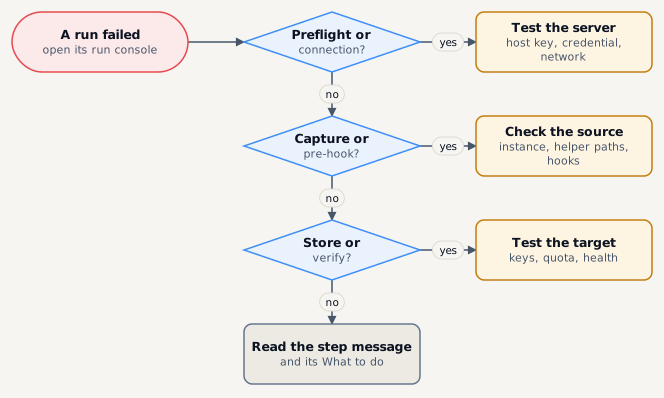
Servers and connections
Section titled “Servers and connections”| Symptom | Likely cause | Fix |
|---|---|---|
| Host key mismatch, every operation blocked | The host was rebuilt or its key changed - or something is pretending to be it. | Compare the new fingerprint on the host’s console, then re-pin: it asks for your second factor and the hostname typed out. If you cannot explain the change, do not re-pin. |
| Authentication failed | Wrong key or password, the account is missing, or the key is refused from the platform’s address. | Replace material on the credential; re-run the onboarding script; check The platform connects from. |
| Unreachable | DNS, firewall, port or jump host. | Run the test on the server - fix the first failing check. |
| Test fails at The login shell says nothing of its own | A login script prints a banner or text. | Make .bashrc / .profile quiet for non-interactive shells. |
| Permission denied reading files | The path is outside what bmp-helper may read, or no helper is installed. |
Re-run the onboarding script with the path under The helper may read under. |
Databases
Section titled “Databases”| Symptom | Likely cause | Fix |
|---|---|---|
| Instance Authentication failed | Wrong user or password, or missing grants. | Edit the instance; follow its Prerequisites panel for the backup user’s grants. |
| Instance Unreachable | Wrong host, port or container name; container re-created with another name. | Use the container’s name (not its id); test again. |
| Capture fails: tool not found | The dump tool is missing where it runs. | Set Where the dump tool runs to ephemeral container or platform tunnel. |
Storage
Section titled “Storage”| Symptom | Likely cause | Fix |
|---|---|---|
| Target unhealthy | Wrong endpoint, keys, bucket or region; certificate problem. | Test connection from the target’s menu; check the keys and endpoint; Prepare bucket for a new bucket. |
| Capacity warnings | The quota is nearly used. | Check retention policies, raise the quota, or add a target. |
| Local target Not independent | The directory shares a disk with the platform. | Move it to its own disk or use a bucket. |
Plans and runs
Section titled “Plans and runs”| Symptom | Likely cause | Fix |
|---|---|---|
| Plan cannot be saved: policy | The environment or target forbids the format or encryption chosen. | Pick an allowed option - greyed-out options say why. |
| Runs are Skipped | Maintenance mode, outside the schedule’s window, or an overlap rule. | Check Admin › Settings and the schedule’s window. |
| Backups stop before they start | A hook of the plan is waiting for approval. | Have someone other than its author approve it under Admin › Hook scripts. |
| Red degraded banner | One of the platform’s own health checks fails. | Open Admin › System status - see System status. |
Restore and sign-in
Section titled “Restore and sign-in”| Symptom | Likely cause | Fix |
|---|---|---|
| Restore waits | The environment requires approval. | An approver - not you - decides on Restore › Approvals. |
| Asked to Confirm it is you | A sensitive action needs a fresh second-factor code. | Enter a current authenticator code (recovery codes do not work here). |
| A menu item is missing | Your role does not include it. | Ask an administrator for the role or permission. |
| Locked out after wrong passwords | Five failures within 15 minutes. | Wait 15 minutes, or ask an administrator to Unlock you. |