

Recover the platform
Import from storage
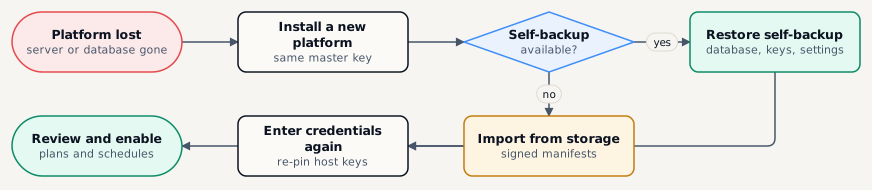
Section titled “Import from storage”Admin › Import from storage rebuilds the catalogue from the signed _manifest.json files on the targets you choose.
- Each manifest is read with the target’s reader key and its signature checked; unsigned or tampered manifests are quarantined, never imported.
- Servers and plans the catalogue no longer has come back disabled, with nothing scheduled or pruned, until you review them.
- Credentials are not in storage - enter them again, and re-pin host keys.
- Running it twice adds nothing.
Configuration export and import
Section titled “Configuration export and import”| Action | What it does |
|---|---|
| Export | Prepare the export, then download bmp-configuration.json: environments, retention policies, servers and plans. Credentials and targets appear by name only; host keys, users, audit data and secrets are never in it. |
| Import | Upload a document and review each item. Nothing is deleted, existing plans are not overwritten, servers arrive without a pinned host key and plans disabled. |
| Secret store escrow | Every credential, decrypted and re-encrypted to a passphrase you choose, downloaded once. Keep the file and passphrase apart, offline. Open it with bmctl decrypt --password-file …. |