

Your first backup in six steps
-
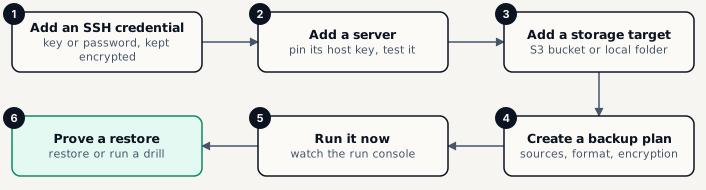
Add an SSH credential
Infrastructure › SSH credentials › New credential. Paste a private key (preferred) or a password for the account the platform will use.
- Guide: Add an SSH credential
-
Add a server
Infrastructure › Servers › Add server. Enter the host, pick the credential, compare and approve the host key fingerprint, then run the test.
- Guide: Add a server
-
Add a storage target
Storage › Storage targets › New target. Point it at an S3-compatible bucket or a local folder and wait for the health check to pass.
- Guide: Add a storage target
-
Create a backup plan
Backups › Backup plans › New plan. The wizard walks you through server, sources, output and encryption, storage, schedules and notifications.
- Guide: Create a backup plan
-
Run it now
Open the plan and choose Run now. The run console shows every stage live; the run ends Succeeded with its artifacts listed.
- Guide: Run a backup now
-
Prove a restore
Restore › Restore points, pick the new backup and restore it to a test location - or let a drill do it every week.
- Guide: Restore a backup · Drills