Grandfather-father-son
Keep the newest of each hour, day, week, month and year - e.g. 7 days, 4 weeks, 12 months.
Grandfather-father-son
Keep the newest of each hour, day, week, month and year - e.g. 7 days, 4 weeks, 12 months.
Count
Keep the newest N restore points.
Age
Keep N days - counted from the newest backup, so if backups stop the last good ones stay.
Forever
Nothing is pruned; restore points go only when somebody deletes them.
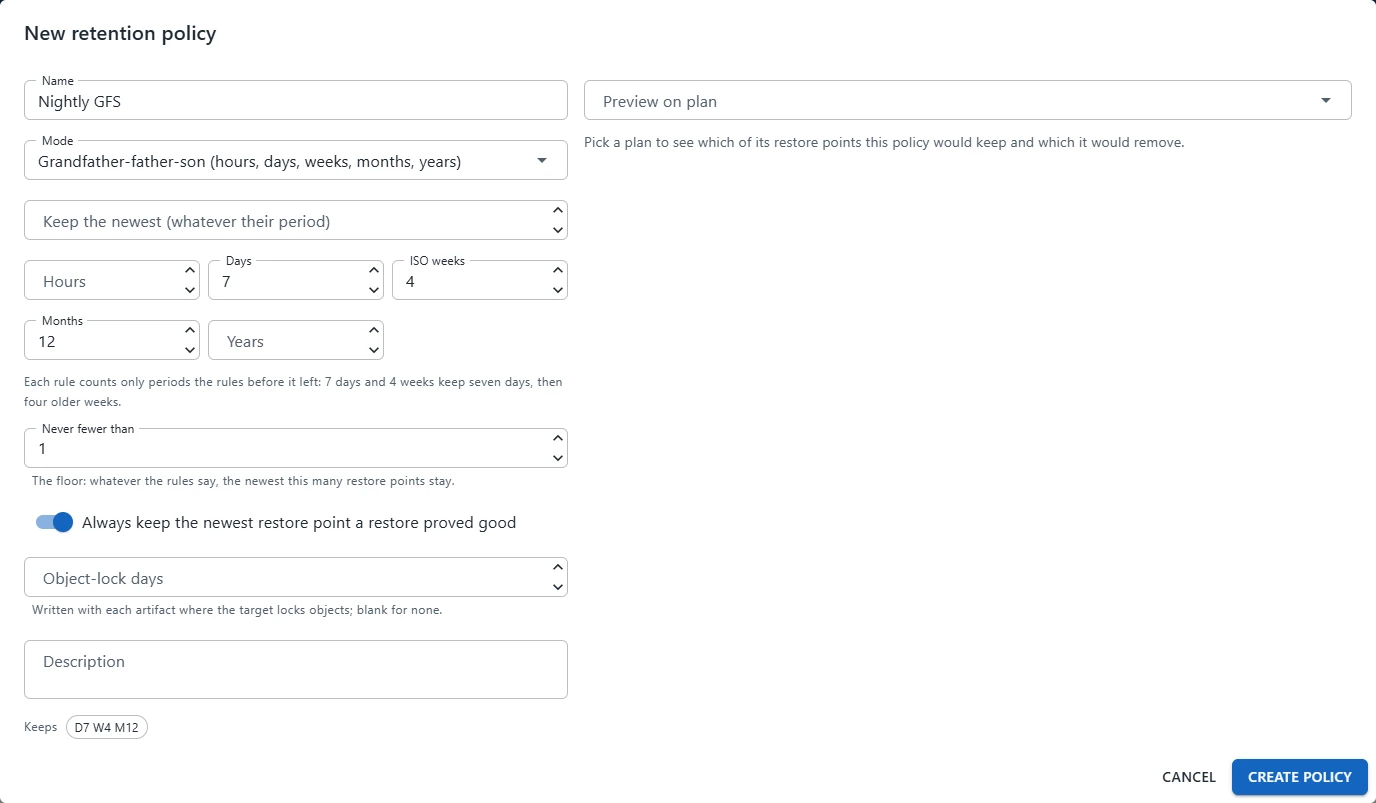
Open Storage › Retention policies and click New policy
Name it and choose the Mode, then fill in the numbers
In GFS each rule counts only the periods the rules before it left: 7 days and 4 weeks keep seven days, then four older weeks.
Set the safety nets
Never fewer than - a floor: the newest N always stay, whatever the rules say.
Always keep the newest restore point a restore proved good.
Object-lock days - written with each artifact where the target locks objects.
Pick a plan in Preview on plan
The editor shows which of that plan’s restore points would be kept or removed, and why, as you change the numbers.
Save, then choose the policy in each plan’s Storage & Retention step