

Restore-verified
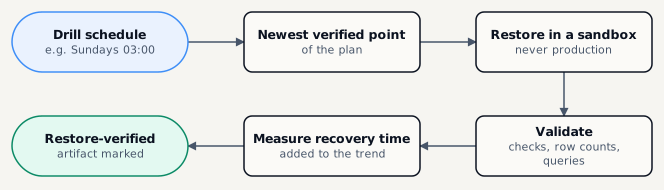
The artifact gets the Restore proven chip - the strongest evidence a backup works.
Open Restore › Drills and click New drill
Choose the Strategy
A database - into a new engine container of the dump’s version.
Files or volumes - into a sandbox path, compared with the backup’s file index.
Pick the Plan and name the drill
Set the Schedule (cron) and Time zone
Five cron fields, e.g. 0 3 * * 0 for Sundays at 03:00.
Pick a Sandbox server
Never the management host and never a production server. Files go under /var/tmp/bmp there.
Add Validation queries if you like, then Save
The engine’s default checks and the backup’s row counts always run; your read-only queries run after them.
Restore-verified
The artifact gets the Restore proven chip - the strongest evidence a backup works.
Recovery time
Each drill measures the real restore time; the drill’s page shows the trend against the plan’s target RTO.
Readiness
Plans with recent successful drills score higher on readiness and reports.