

Keys and the recovery kit
Generate the recovery kit
Section titled “Generate the recovery kit”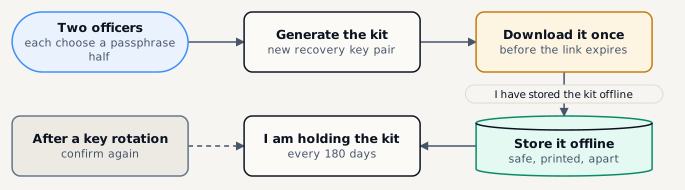
-
Open Admin › Keys & recovery kit
-
Two officers each type one half of the passphrase
Passphrase, first half (at least 12 characters) and Passphrase, second half - each kept by its own person. Neither half alone opens the key export.
-
Click Generate the recovery kit and confirm with your second factor
-
Download the kit - it can be downloaded once, before the link expires
The platform keeps no copy. A missed download means a new kit and a new key pair.
-
Store it offline, then click I have stored the kit offline
Print it, or keep it on removable media in a safe - away from the platform and its backups.
Every 180 days, and after every key rotation, the platform asks somebody to confirm with I am holding the kit. A new kit is a new key pair; artifacts written before keep the key they were written with.
Rotate the platform key
Section titled “Rotate the platform key”Rotate the platform key makes a new version active and re-wraps every artifact’s file key and every stored secret in the background - no backup is re-encrypted. Object-locked runs keep their old header, so the old version stays Decrypt only for them. Rotate every 12 months, and at once on suspicion of compromise.
OpenPGP recipients
Section titled “OpenPGP recipients”For plans in Public key mode, paste a recipient’s armored public key (gpg --armor --export <fingerprint>: a v4 key, RSA 3072+ or Curve25519) and Import the key. The list shows each key’s fingerprint, algorithm, expiry and status. The platform cannot open what it encrypts to these keys: a restore asks for the private key.