

Succeeded
Every source was stored and verified.
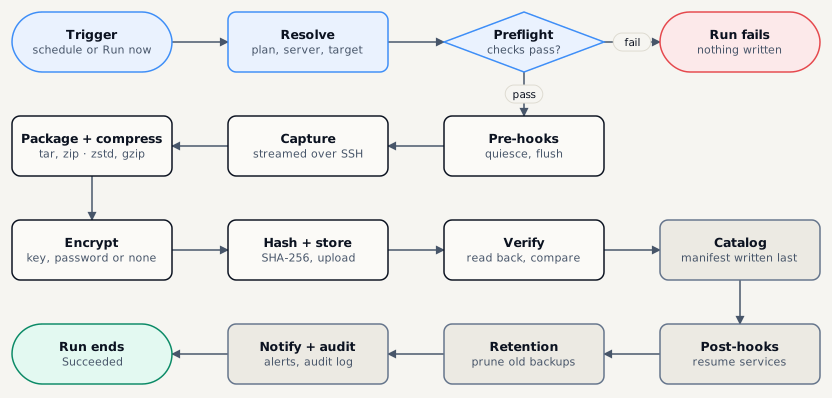
| Stage | What happens |
|---|---|
| Trigger · Resolve | A schedule fires or someone clicks Run now; the run is queued and its plan, server, credential and target are looked up. |
| Preflight | Connection, pinned host key, tools on the server, free space, target health and encryption policy are checked. A failure here writes nothing. |
| Pre-hooks | Optional scripts or container pauses that make the data consistent. |
| Capture · Transport | The data is read on the server (tar, a dump tool, docker export…) and streamed over SSH. No agent, and no temporary copy on the server unless the format needs one. |
| Package · Compress · Encrypt | Always in this order. Compressing after encrypting would gain nothing, so it is impossible. |
| Hash · Store · Verify | A SHA-256 checksum is taken, the artifact is uploaded, then read back and compared. |
| Catalog | The artifact rows and the run’s signed manifest are written. The manifest goes last: it marks the run complete. |
| Post-hooks · Retention · Notify · Audit | Services are resumed, old backups pruned by the retention policy, people notified and the audit log written. |
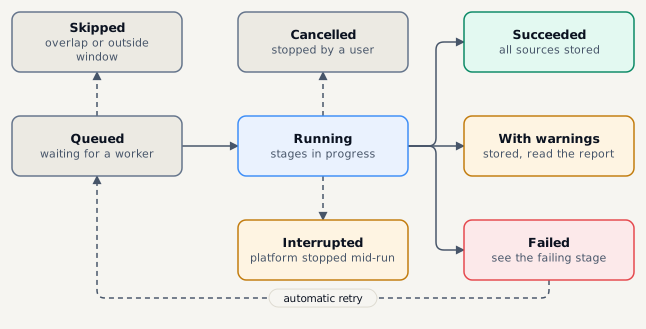
Succeeded
Every source was stored and verified.
Succeeded with warnings
Stored, but something was skipped or dropped - read the run report.
Failed
A stage failed. The run console shows which one and why.
Interrupted
The platform stopped mid-run. Nothing half-written counts as a backup.
Failures that are usually temporary - a dropped connection, a busy target - are retried automatically. By default a plan retries 2 more times, waiting 1 minute, then 5 minutes. A plan can allow at most 5 retries. Permanent failures, such as a wrong password, fail at once.